
Overview
The Personal Weekly app relies on the user being able to access their own employee Contact record in Upvise. This dependency exists because the app is used to create timesheet entries via the Daily Diary form, and the user must be able to read and interact with their related Contact record for the app to load correctly.
Where the employee Contact record has an Owner assigned, a standard user may not have permission to access that Contact. When this occurs, the Personal Weekly app can fail to load and display a blank screen instead.
Symptoms
Users may report the following:
Personal Weekly opens to a blank screen
No error message is shown
User cannot navigate out of the app normally
User may need to force close and reopen Upvise
Cause
This issue is caused by a data access dependency in the Personal Weekly app.
The app requires access to the user’s linked employee Contact record in order to load and allow time entry through the Daily Diary form. If that Contact record has an Owner assigned, access may be restricted for standard users depending on database permissions.
As a result, the app cannot retrieve the required Contact data and fails to render correctly.
Resolution
To resolve the issue, and Upvise Admin User is required to:
Review the impacted user’s employee Contact record in Upvise
Check whether an Owner has been assigned to that Contact
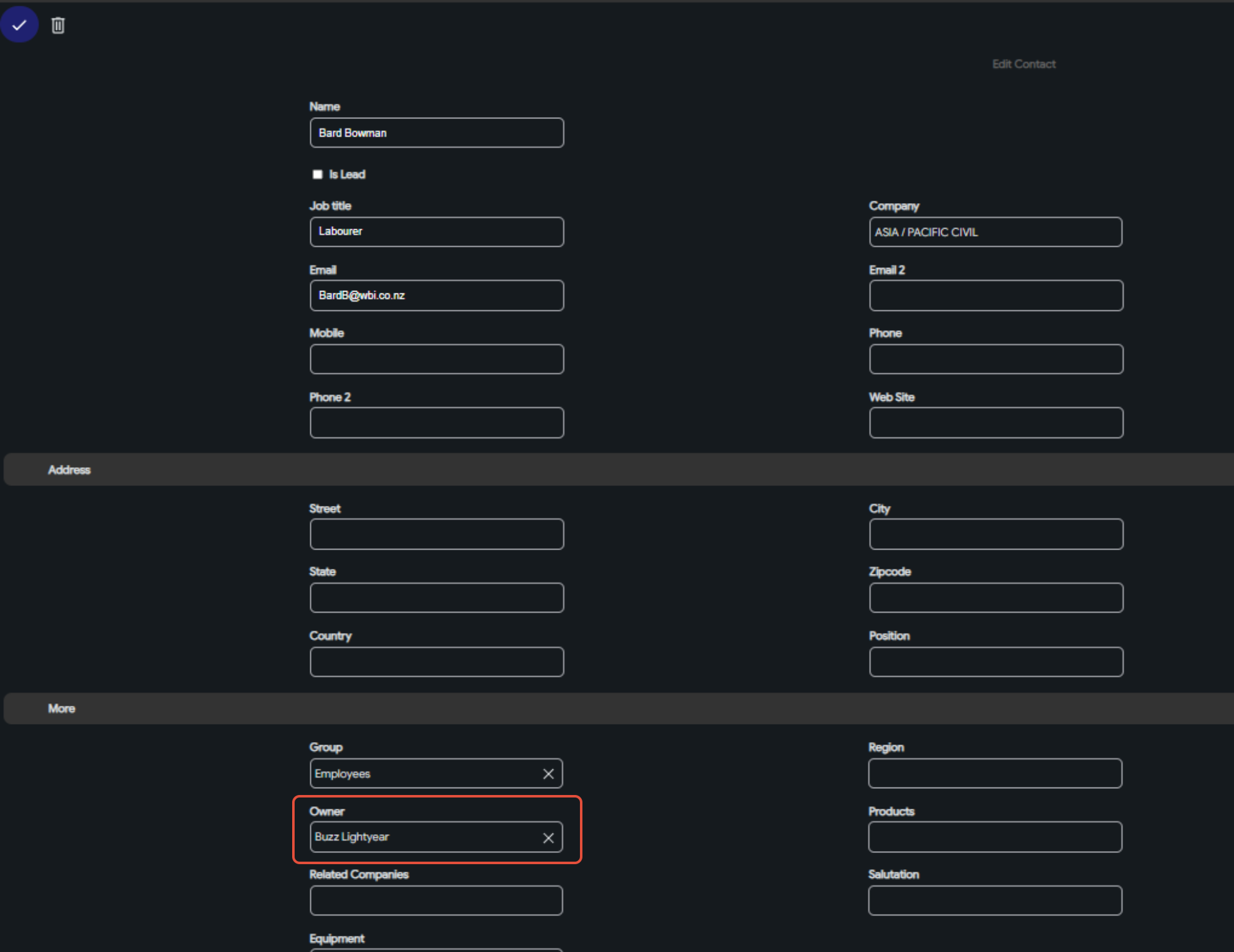
Remove the Contact Owner, or add the employee as an additional owner and SAVE.
Ask the user to fully reload the app, or close and reopen Upvise
Once the Contact Owner is remediated, and the app reloads, the user should be able to access Personal Weekly normally again.